

Getting Started
Once Internet Browser UMG is installed and enabled, add Internet Browser from the UMG palette to any widget — or drop in the shipped WBP_InternetBrowser for tabs, bookmarks, and history.
Pair with Draggable Window for movable desktop-style browser windows.

Quick setup
Section titled “Quick setup”- Enable Internet Browser UMG in Plugins.
- Open your Widget Blueprint.
- Add Internet Browser (core widget) or WBP_InternetBrowser (tab shell).
- Assign Back Button, Forward Button, Reload Button, and Addressbar if using the low-level widget.
- Call Initialize Internet Browser on Event Construct.
- Set Initial URL (must include
http://orhttps://).
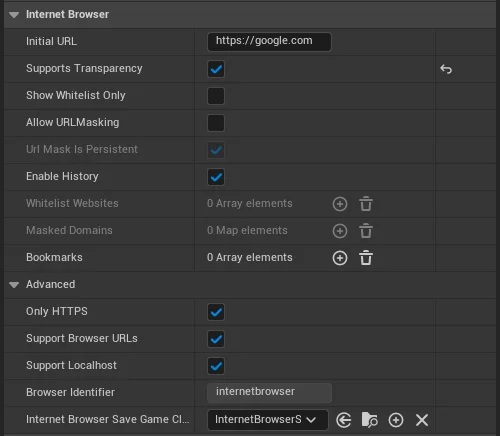
Details panel
Section titled “Details panel”| Setting | Description |
|---|---|
| Initial URL | First page to load (include protocol) |
| Support Transparency | Transparent browser background |
| Show Whitelist Only | Only Whitelist Websites may load |
| Enable History | Record visited pages |
| Whitelist Websites | Allowed domains when whitelist enabled |
| Bookmarks | Initial FBrowserBookmark entries |
| Only HTTPS | Force HTTP → HTTPS |
| Support Browser URLs | Custom protocol links (chrome://-style) |
| Support localhost | Allow 127.0.0.1 and localhost |
| Internet Browser Save Game Class | Optional persistence class |