

City Builder Template
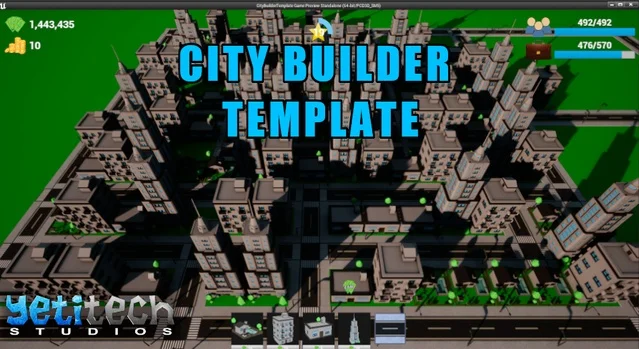
City Builder Template is a complete Blueprint game template for a grid-based city builder. Place roads and buildings, grow population, collect currency from commercial zones, level up your city, and run the simulation at normal or double speed with a day/night cycle.
The project ships as a standalone Unreal 5.8 project (template version 1.7, tested on UE 5.7+). All gameplay lives under Content/CityBuilderTemplate/.
Architecture
Section titled “Architecture”flowchart TB
subgraph ui [UI]
WBP_MainMenu
WBP_PlayerHUD
WBP_BuildingSelect
WBP_RoadFrame
end
GI[BP_CBT_GameInstance]
PC[BP_CBT_PlayerController]
Pawn[BP_CBT_PlayerPawn]
GS[BP_CBT_GameState]
SG[BP_CBT_Singleton]
TOD[BP_CBT_TimeOfDay]
Grid[BP_CBT_Grid]
Save[BP_CBT_SaveGame]
GI --> WBP_MainMenu
GI --> Save
PC --> Pawn
PC --> Grid
PC --> Buildings[BP_CBT_BaseBuilding hierarchy]
PC --> Roads[BP_Road / BP_RoadTile]
SG --> WBP_PlayerHUD
TOD --> SG
GS --> TOD
Buildings --> Save
Roads --> Save
What is included
Section titled “What is included”| Area | Path | Purpose |
|---|---|---|
| Main menu map | Maps/MainMenu | Game default map — WBP_MainMenu |
| Demo map | Maps/DemoMap | Editor startup map and playable city level |
| Game mode | Blueprints/BP_CBT_GameMode | Spawns BP_CBT_PlayerPawn + BP_CBT_PlayerController |
| Game instance | Blueprints/BP_CBT_GameInstance | Save object creation, load-game flag, level travel |
| Player controller | Blueprints/BP_CBT_PlayerController | Placement, roads, bulldoze, building selection, save/load |
| Player pawn | Blueprints/BP_CBT_PlayerPawn | Top-down camera movement, zoom, building rotation |
| Game state | Blueprints/BP_CBT_GameState | ESimulationState (paused / normal / double speed) |
| Singleton | Blueprints/BP_CBT_Singleton | Currency, XP, level, population, premium cash, broadcast events |
| Time of day | Blueprints/BP_CBT_TimeOfDay | Day/night cycle, sun rotation, night checks |
| Grid | Blueprints/Misc/BP_CBT_Grid | Snap grid used for building and road placement |
| Buildings | Blueprints/Buildings/ | BP_CBT_BaseBuilding, residential/commercial bases, four in-game types |
| Roads | Blueprints/Roads/ | BP_Road (spline preview) and BP_RoadTile (placed segments) |
| Vehicles | Blueprints/Environment/BP_Vehicle | Ambient traffic on road tiles |
| Save game | Blueprints/BP_CBT_SaveGame | Buildings, roads, vehicles, currency, XP, level |
| Widgets | Blueprints/Widgets/ | HUD, building/road frames, timers, level-up notifications |
| Globals | Blueprints/BFL_CBT_GlobalFunctions | Currency, grid snap, simulation state helpers |
| String table | Misc/ST_CityBuilderTemplate | Localized building names and level-up copy |
| Guided tutorials | 1_BP_CBT_Tut_* … 5_BP_CBT_Tut_* | In-editor tutorial chain (GuidedTutorials plugin) |
Shipped building types
Section titled “Shipped building types”| Blueprint | Type | Role |
|---|---|---|
| BP_CBT_House | Residential | Small home — adds inhabitants after construction |
| BP_CBT_Apartment | Residential | Larger residential block |
| BP_CBT_Shop | Commercial | Generates income; manual or auto collect |
| BP_CBT_OfficeBuilding | Commercial | Higher-tier commercial income |
Gameplay loop
Section titled “Gameplay loop”sequenceDiagram participant Menu as WBP_MainMenu participant PC as BP_CBT_PlayerController participant Grid as BP_CBT_Grid participant Bld as BP_CBT_BaseBuilding participant SG as BP_CBT_Singleton participant HUD as WBP_PlayerHUD Menu->>PC: Play Game → DemoMap PC->>Grid: Snap placement to grid (GridSize / defaultGridSize) PC->>Bld: Preview → Start Construction Bld->>SG: AddPopulation / CollectIncome SG->>HUD: OnCurrencyUpdated / OnLevelUp HUD->>PC: Save / Load / Simulation speed
- Main menu — Play Game opens DemoMap; Load Game restores slot
CityBuilderSaveGamewhen a save exists. - Roads first — drag spline roads with BP_Road; placed segments become BP_RoadTile instances snapped to the grid.
- Build — pick residential or commercial types from WBP_BuildingSelect / WBP_BuildingFrame; preview with the mouse, rotate with Z / C, place with primary click.
- Construction — BP_CBT_BaseBuilding runs a timer (ConstructionTime); WBP_ConstructionTimer shows remaining time.
- Operate — residential buildings add inhabitants up to Inhabitant Max Limit; commercial buildings hire workers and generate income from Revenue Per Worker (collect via WBP_CollectCurrency or bAutoCollectIncome).
- Progress — BP_CBT_Singleton tracks XP and city level; WBP_LevelUpNotification announces unlocks (UnlockLevel on each building).
- Simulate — WBP_PlayerHUD controls Paused, NormalSpeed, and DoubleSpeed via ESimulationState on BP_CBT_GameState.
- Day/night — BP_CBT_TimeOfDay rotates the sun (Sun Speed); vehicles and building lights respond via OnDayStarted / OnNightStarted.
Shipped defaults (quick reference)
Section titled “Shipped defaults (quick reference)”Values read from class defaults in the open FAB project (v1.7).
| System | Key defaults |
|---|---|
| New game wallet | Starting Currency 100000, Starting Premium Cash 10 (BP_CBT_PlayerController) |
| Player level | Current Level 1, Max Player Level 50 |
| Grid snap | Grid Size 200 on controller; Default Grid Size 100, Grid Divisions 4 on BP_CBT_Grid |
| Save slot | CityBuilderSaveGame (user index 0) |
| Camera (BP_CBT_PlayerPawn) | Min Zoom 500, Max Zoom 4500, Zoom Increment 600, Camera Rotation Speed 100 |
| Day/night | Sun Speed 10, bEnable Day Night Cycle true |
| Simulation | ESimulationState default NormalSpeed on BP_CBT_GameState — None, Paused, NormalSpeed, DoubleSpeed |
Building defaults
Section titled “Building defaults”| Building | Currency | Premium | Construction (s) | Unlock | XP | Residential / commercial |
|---|---|---|---|---|---|---|
| BP_CBT_House | 10 | 0 | 5 | 1 | 70 | Inhabitant Max Limit 4, delay 2 s |
| BP_CBT_Apartment | 10 | 10 | 15 | 1 | 128 | Inhabitant Max Limit 12, delay 2.2 s |
| BP_CBT_Shop | 5 | 12 | 5 | 2 | 135 | Worker Max Limit 10, hire delay 1.5 s, Revenue Per Worker 268, Profit Delay 60 s |
| BP_CBT_OfficeBuilding | 10 | 24 | 10 | 1 | 200 | Worker Max Limit 10, hire delay 2.3 s, Revenue Per Worker 1240, Profit Delay 120 s |
Shops and offices ship with bAutoCollectIncome = false and bGetXpWhenCollectingCurrency = true (Currency Collect XP = 3).
Guides
Section titled “Guides”| Page | Description |
|---|---|
| Getting started | Open the project, controls, content layout |
| Overview | Step-by-step customization with example presets |
| Blueprint reference | Actors, enums, structs, functions, and widgets |