

Getting Started
Objective Waypoint System is a Blueprint asset package you migrate from the FAB project into your own Unreal Engine game. The only asset you must migrate is BP_WaypointComponent — it handles nav-mesh queries and waypoint rendering.
Preview:
Prerequisites
Section titled “Prerequisites”- A level with a built Nav Mesh Bounds Volume and generated navigation mesh.
- A player Character or Pawn Blueprint where you can add components.
Migrate the component
Section titled “Migrate the component”- Add Objective Waypoint System from FAB and open the project.
- In Content Browser, go to Content/ObjectiveWaypointSystem/Blueprints.
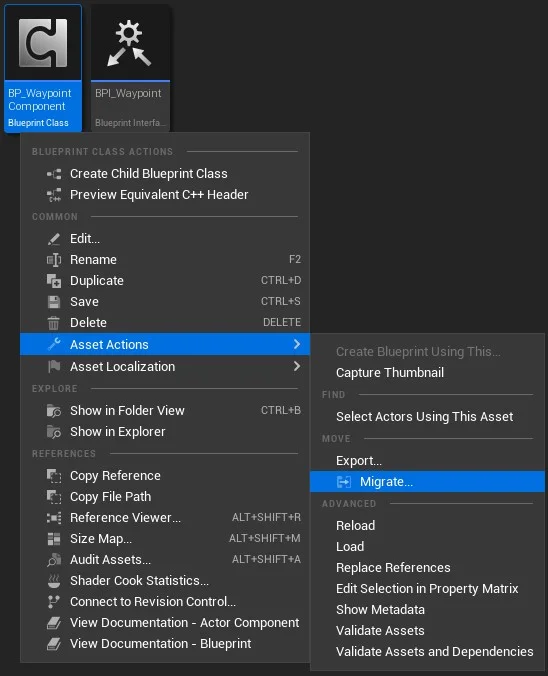
- Right-click BP_WaypointComponent → Asset Actions → Migrate.
- Select your project’s Content folder and confirm dependencies (includes BP_WaypointActor, ENavMode, meshes, and materials).
flowchart LR
  FAB[FAB project] --> Migrate[Migrate BP_WaypointComponent]
  Migrate --> YourProj[Your Content folder]
  YourProj --> Add[Add to player pawn]
  Add --> Call[Find Path to Actor / Location]
Add to your pawn
Section titled “Add to your pawn”- Open your player character Blueprint.
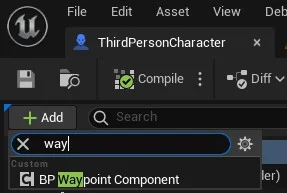
- Add Component → search BP_WaypointComponent (or drag from Content Browser).
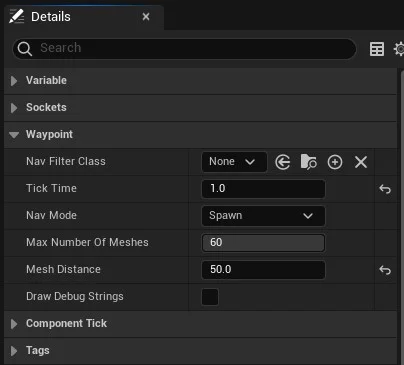
- Select the component and review Class Defaults:
| Property | Description |
|---|---|
| Nav Filter Class | Limit pathfinding to a specific navigation query filter class. Default: None (all nav areas). |
| Tick Time | When > 0, pathfinding runs automatically every N seconds. Default: 0 (manual calls only). |
| Nav Mode | Spawn — place BP_WaypointActor markers. SplineMesh — deform mesh segments along the path. |
| Max Number Of Meshes | Maximum spawned markers in Spawn mode. Default: 60. 0 tries to fill the entire path (not recommended). |
| Mesh Distance | Spacing between markers in world units. Default: 250. Only applies in Spawn mode. |
| Draw Debug Strings | Show debug labels on spawned actors. Default: false. |
Call pathfinding
Section titled “Call pathfinding”Once the component is on your pawn, your game logic decides when and where to navigate. Call one of the Blueprint events on BP_WaypointComponent:
| Event | Inputs | Use when |
|---|---|---|
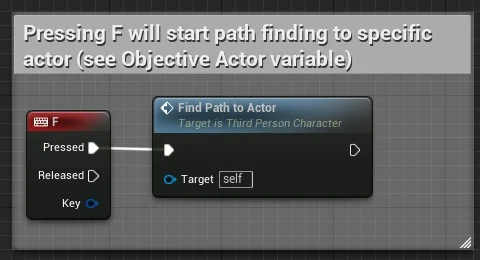
| Find Path to Actor | Target Actor, optional Spline Component | Quest objective, NPC, interactable |
| Find Path to Location | Vector location, optional Spline Component | Map ping, minimap click, custom marker |
The shipped ThirdPersonCharacter wraps these calls with objective selection and HUD toggles — use it as a reference, not a required dependency.
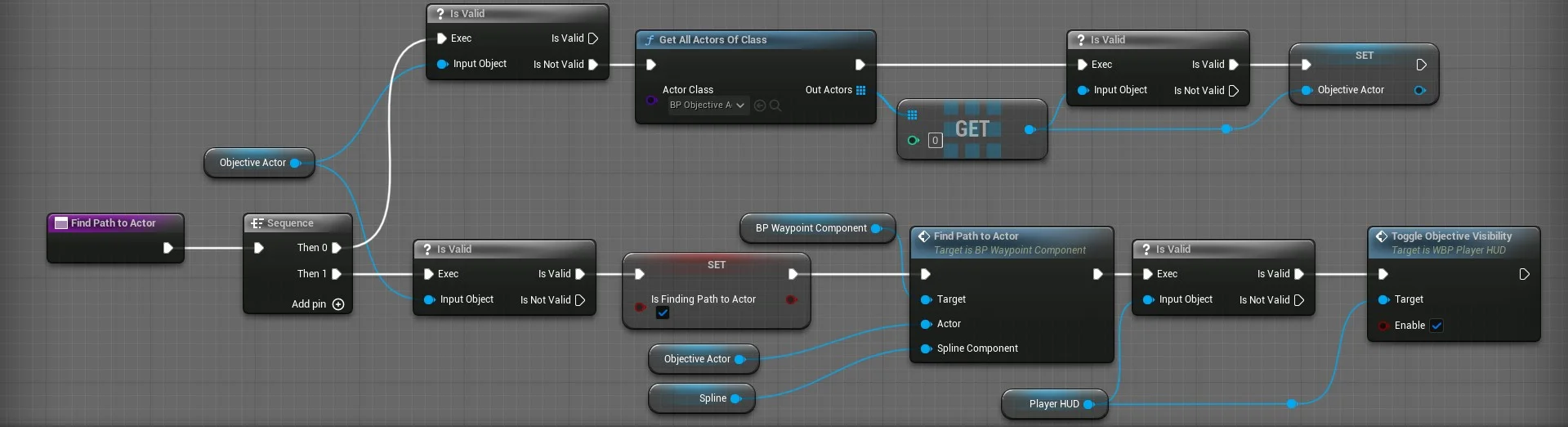
Example: press F to path to the current objective (from the demo project):
sequenceDiagram
  participant Input as Input / quest logic
  participant Pawn as Your character
  participant WC as BP_WaypointComponent
  Input->>Pawn: Target actor or location ready
  Pawn->>WC: Find Path to Actor (Actor, Spline)
  WC->>WC: Query nav mesh + spawn visuals
Try the demo first (recommended)
Section titled “Try the demo first (recommended)”Before migrating, press Play on Map/Overview in the FAB project:
| Key / action | Behaviour |
|---|---|
| F | Find path to Objective Actor (or first BP_ObjectiveActor in level) |
| Minimap click | Find path to clicked world location |
| Move | Third-person locomotion with camera |
See Try the demo for a full walkthrough.
Next steps
Section titled “Next steps”| Task | Guide |
|---|---|
| Wire quest objectives to pathfinding | Find path to an actor |
| Switch spawn arrows vs spline trail | Switch navigation modes |
| Custom arrow mesh or material | Customize waypoint visuals |
| Move assets into your game | Migrate into your project |
| Property and function lookup | Blueprint reference |