

Prerequisites
Complete these steps once before working through the Overview series.
Enable plugin content
Section titled “Enable plugin content”The plugin ships demo maps, hardware Blueprints, program collections, and UI widgets under Engine → Plugins → OperatingSystemSimulator.
- In the Content Browser, open View Options.
- Enable Show Engine Content and Show Plugin Content.
See Getting Started for screenshots and the DemoMap path.
Build the project
Section titled “Build the project”If Unreal reports module ‘GlobalCore’ could not be found, generate Visual Studio project files from your .uproject and build once. Blueprint-only projects still need this step.
Editor preference — timers and delays
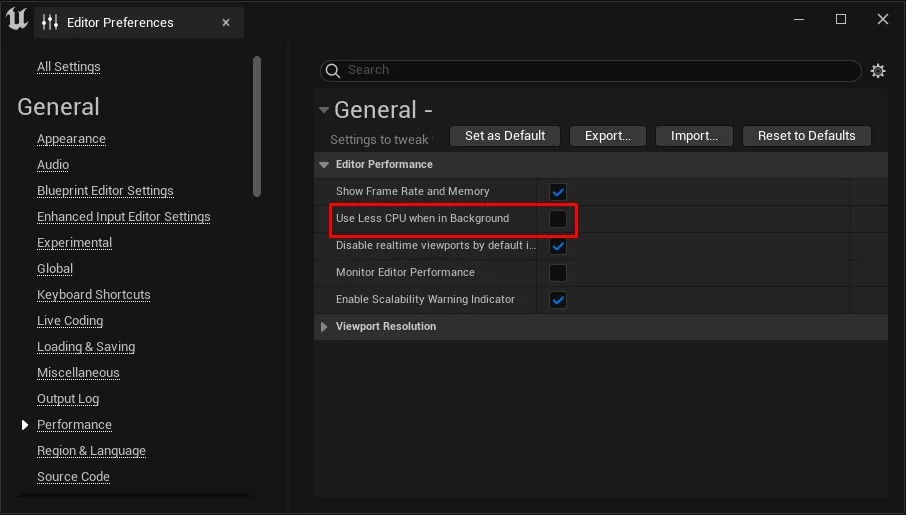
Section titled “Editor preference — timers and delays”The plugin relies on Delay nodes and timers. With Use Less CPU when in Background enabled, PIE can stall when the editor loses focus and boot/install sequences may hang.
- Edit → Editor Preferences → General → Performance
- Disable Use Less CPU when in Background
Copy before you modify
Section titled “Copy before you modify”Recommended learning path
Section titled “Recommended learning path”flowchart TB
subgraph row1[" "]
direction LR
Prerequisites["Prerequisites"] --> Demo["Try the demo map"] --> Actor["Create a device actor"]
end
subgraph row2[" "]
direction LR
Device["Create a device"] --> OperatingSystem["Create an operating system"] --> Programs["Programs & terminal commands"]
end
Actor --> Device
| Step | Tutorial |
|---|---|
| Explore working example | Try the demo map |
| Minimal custom OS | Create device actor → device → OS |
See the full tutorial overview for all guides.