

Getting Started
Before we begin, let’s understand what exactly is viewport world. Viewport World lets you create a new UWorld inside Operating System World allowing you to play a game inside Operating System itself.
flowchart TB
  subgraph row1[" "]
    direction LR
    Main["Primary game UWorld"] --> OS["Operating System program"] --> VW["ViewportWorldWidget"]
  end
  subgraph row2[" "]
    direction LR
    Secondary["Secondary UWorld"] --> Game["ViewportWorldPawn / ViewportWorldCharacter"]
  end
  VW --> Secondary
To get an idea, here are some previews of Viewport World.
Playing a game preview
Section titled “Playing a game preview”This video shows a game world with widgets playing inside Operating System World.
Virtualization simulation preview
Section titled “Virtualization simulation preview”This preview shows virtualization simulation similar to softwares like VirtualBox, VMware etc.
Secondary world communication preview
Section titled “Secondary world communication preview”Communicate with the game world using our Global Messenger Subsystem.
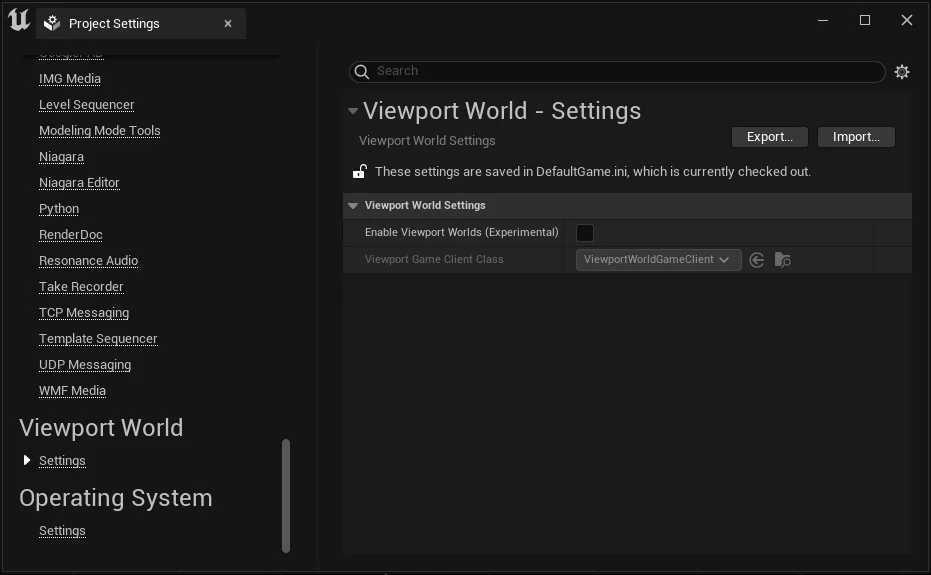
Viewport worlds are disabled by default because of their experimental nature and must be explicitly enabled by the developer, who must acknowledge that it is an experimental feature and might not support all types of levels. Go to Project Settings -> Viewport World -> Settings and select Enable Viewport Worlds (Experimental).
You can now open any UMG widget Blueprint and drag ‘n’ drop a viewport world widget which will host your target world.